FREE EXCEL TEMPLATE
Rent tracking in Excel: a free template and quick guide
Record rent payments and expenses. See your monthly totals in one table.
INSIDE THE TEMPLATE
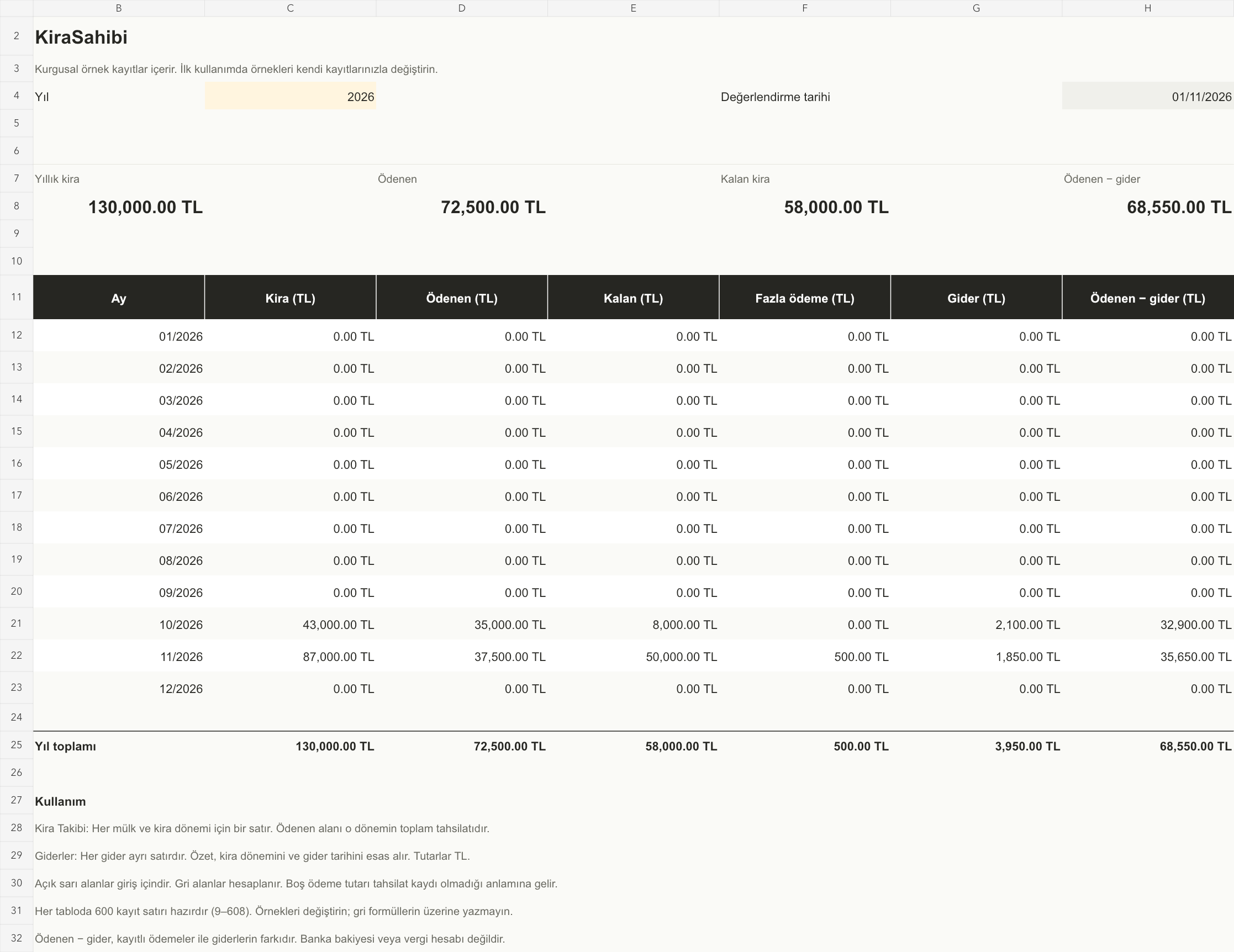
The summary. At a glance.
QUICK START GUIDE
Start in three steps.
- 01
Enter your rent records.
Use one row for each property and month. Enter the rent amount, due date and total amount paid.
- 02
Add your expenses.
Enter the date, property, category and amount.
- 03
Check the summary.
Select a year to see paid rent, outstanding rent and expense totals.
Replace the sample records with your own. Fill in the yellow cells; the grey cells calculate automatically.
Three sheets: Özet (Summary), Kira Takibi (Rent Tracking) and Giderler (Expenses). The rent and expense sheets each have 600 prepared entry rows.
For partial payments, update the total paid for the same property and period. Do not add a separate rent row for each payment.
The workbook is in Turkish and supports TRY amounts only. It is not a transaction-level payment ledger and does not calculate exchange rates, tax or interest. Paid rent minus expenses is not a bank balance.
Rent tracking. On your phone.
KiraSahibi is in development for iOS and Android.